mailto: HTML email link, what is it, how to create, examples and code generator.
Mailto link is a type of HTML link that activates the default mail client on the computer for sending an e-mail.
The web browser requires a default e-mail client software installed on his computer in order to activate the e-mail client.
If you have Microsoft Outlook, for example as your default mail client, pressing a mailto link will open a new mail window.
The mailto link is written like regular link with extra parameters inside the href attribute:
<a href="mailto:name@email.com">Link text</a>
| Parameter | Description |
|---|---|
| mailto:name@email.com | e-mail recipient address |
| cc=name@email.com | carbon copy e-mail address |
| bcc=name@email.com | blind carbon copy e-mail address |
| subject=subject text | subject of e-mail |
| body=body text | body of e-mail |
| ? | first parameter delimiter |
| & | other parameters delimiter |
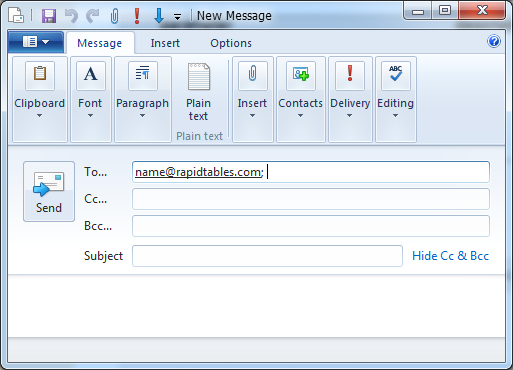
<a href="mailto:name@rapidtables.com">Send mail</a>
The code will generate this link:
Pressing the above link will open a new mail window:
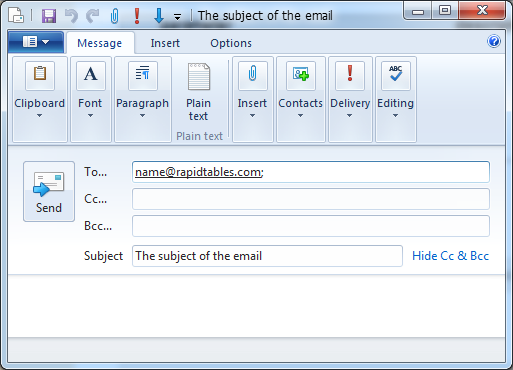
<a href="mailto:name@rapidtables.com?subject=The%20subject%20of%20the%20mail">Send mail with subject</a>
The %20 represents space character.
The code will generate this link:
Pressing the above link will open a new mail window:
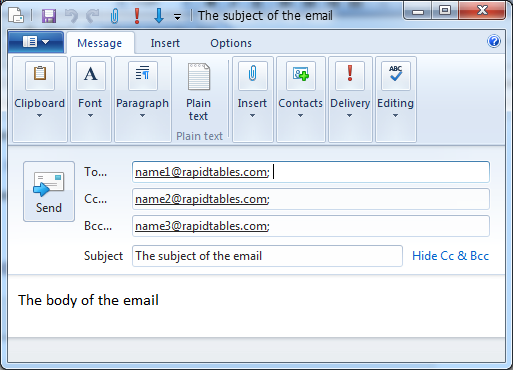
<a href="mailto:name1@rapidtables.com?cc=name2@rapidtables.com&bcc=name3@rapidtables.com
&subject=The%20subject%20of%20the%20email
&body=The%20body%20of%20the%20email">
Send mail with cc, bcc, subject and body</a>
The %20 represents space character.
The code will generate this link:
Send mail with cc, bcc, subject and body
Pressing the above link will open a new mail window:
You can add spaces by writing %20 in the text of the subject or body.
<a href="mailto:name@mail.com?subject=The%20subject&body=This%20is%20a%20message%20body">Send mail</a>
You can add newline by writing %0D%0A in the text of the body.
<a href="mailto:name@mail.com?body=Line1-text%0D%0ALine2-text">Send mail</a>
You can add multiple recipients by writing a comma separator (,) between email addresses.
<a href="mailto:name1@mail.com,name2@mail.com">Send mail</a>
* the mailto link will not work if the user did not define a default mail app in his computer.

